Offer Pass
Configure an Offer Pass and the claimable offers people unlock inside it.
Group several claimable offers behind one entry point, so people open a single pass and browse all the offers you bundle inside it. The pass is the container; each offer inside it is an item people unlock and claim for its own reward.
Before you begin
- You know which offers belong inside the pass.
- Each offer will have its own reward, created with Create an Offer Reward.
- You have the copy ready for the pass banner, title, subtitle, and description.
An Offer Pass needs at least one offer
The pass is only the container that holds offers. You can publish it only once at least one offer points back to it.
Assets you'll need
An offer pass leads with a banner and uses a reward icon for each offer.
Banner Image
OptionalThe header image for an activity, offer, receipt challenge, or treasure hunt.
- Optional
- Size900 × 600 px
- Aspect ratio3:2
- FormatsJPEG / WEBP / PNG
Reward Icon
OptionalThe icon that represents a reward.
- Optional
- Size800 × 800 px
- Aspect ratio1:1
- FormatsJPEG / WEBP / PNG
Circular design and a transparent background work best.
For every image spec in one place, see Image & asset specs.
How a pass works
People open the pass first, then browse and unlock the offers linked to it. The pass is the container; each offer is one item inside it, and its Associated Reward is what people receive when the claim succeeds.
Configure the pass
Create the pass
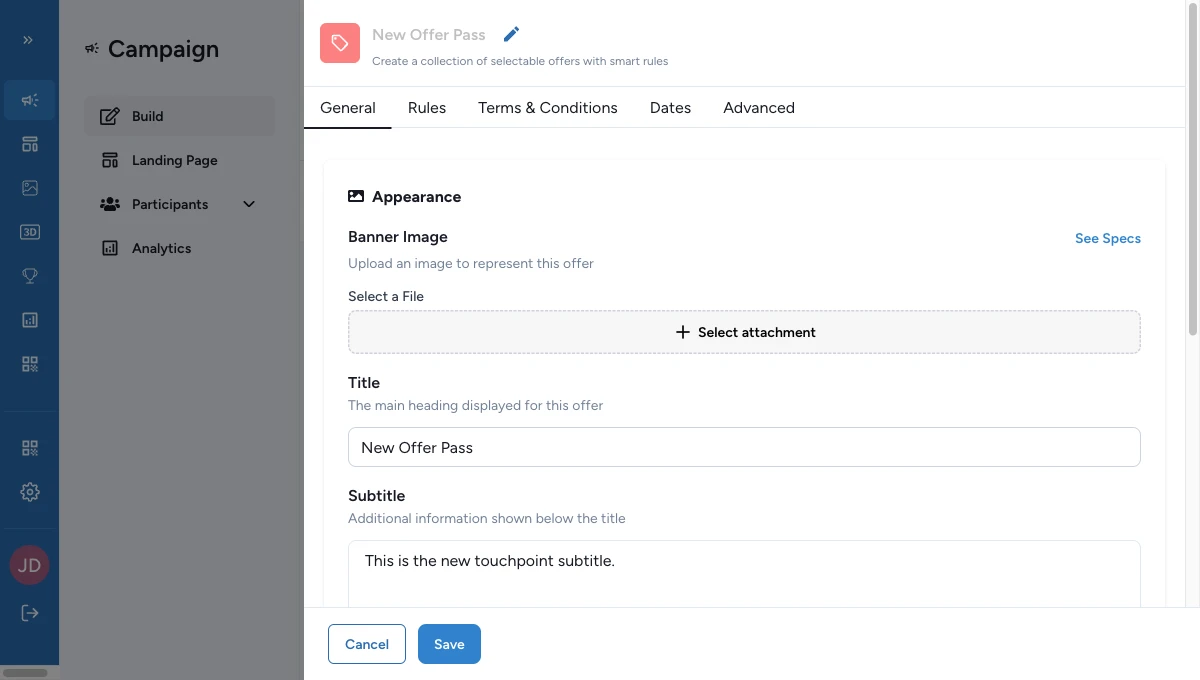
Go to Build > Touchpoints > Add New Touchpoint, choose Offer Pass, then fill the appearance fields: Banner Image, Title, and Subtitle.
Make the pass recognizable before anyone opens an individual offer.
Describe what the pass contains
In Offer Pass Details, write the main description for the pass.
Keep it specific: explain what kinds of offers are inside, who they are for, or what makes the bundle worth opening.
Choose how the offers behave together
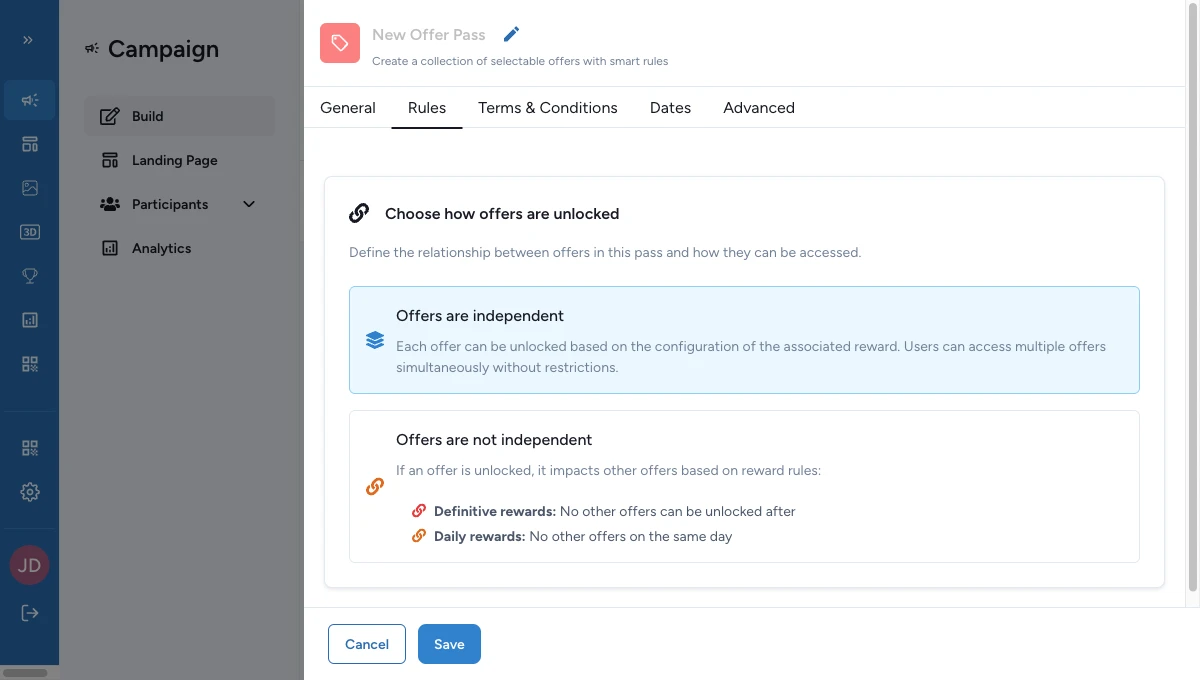
Use the rules area to decide whether the offers stay independent or affect one another.
- Keep offers independent when you want the simplest setup to explain — unlocking one has no effect on the others.
- Let one offer affect the others when unlocking one should change what's available. Test the full path with real rewards before launch.
Add and configure each offer
Each offer is its own touchpoint that links back to this pass. The pass is the container people browse; each offer is an item they can actually unlock and claim.
Give each offer its own reward
Link one offer to one reward of its own. Create the reward with Create an Offer Reward and pick this offer, so the reward stays tied to it. Reusing the same reward across several offers, or across both offers and games, blocks publishing with a validation error — it isn't just a warning.
Link the offer to its pass
Create the Offer touchpoint, then set its Associated Offer Pass to this pass.
Without that link, the offer won't appear in the pass you intend.
Add the copy people see
Set the offer title and the short copy people need to understand what they're unlocking.
Keep it specific enough that people can tell this offer apart from the others in the same pass.
Select the reward
Open Associated Reward and choose the reward you created for this offer. This is what people claim when the offer is available.
Check the reward
Before you publish, confirm all of the following:
- you created the reward with Create an Offer Reward
- you picked this offer when you created the reward
- the offer's Associated Reward points to that reward
- the reward still has its offer settings filled in
Test what people go through
Open the pass as a participant and confirm each offer shows as claimable, unavailable, or sold out as intended.
If publishing is blocked
A few common reasons and how to fix them:
- The banner image is missing — open the Offer Pass and upload a banner image in General > Appearance.
- The title is missing — add a title people will see in General > Appearance.
- The subtitle is missing — add a subtitle so people can tell at a glance what the pass contains.
- The description is missing — write the pass description in Offer Pass Details.
- No offers are linked — create the Offer touchpoints and set their Associated Offer Pass to this pass.
- An offer has no title — open the offer's Appearance and add a title people will see.
- An offer has no reward — open the offer and choose a reward in Associated Reward.
- The reward isn't an offer reward — in Build > Rewards, create it again with Create an Offer Reward and pick this offer.
- The reward is tied to the wrong offer — create the offer reward again and pick the correct offer.
- The reward is missing its offer settings — edit the reward and fill in the offer fields.
- More than one reward is linked to an offer — keep it to one reward per offer.