Hook functions
Write a function that runs inside an OmniLab operation and decides whether it continues, then bind it to a hook point.
A hook function runs during an operation, not after it. OmniLab pauses, calls your code, and does what your answer says: continue, optionally with values you supply, or refuse. That power is why hook functions need more care than platform event functions.
When to use it
Choose a hook function when an operation's outcome must depend on your logic. Examples: blocking sign-ups from disposable email domains, normalising data before it's stored, or sending verification mail through your own provider. To react to something that already happened, use a platform event function instead.
The two hook points
A hook function is created for one hook point and can only ever bind to that one.
| Hook point | Runs when | Your export | continue lets you |
|---|---|---|---|
contact.create.pre | Before a contact is stored, from sign-up, admin, import or API | onContactCreatePre | Rewrite the email, phone number and custom fields |
contact.verify | A double opt-in sign-up needs its verification email | onContactVerify | Report the provider's message id, or that the address is already verified |
What a hook guarantees
| When | contact.create.pre | contact.verify |
|---|---|---|
| No active binding covers the organisation | The contact is stored as submitted | The sign-up fails, and campaigns there can't be published while double opt-in is on |
Your handler returns continue | The fields you returned are applied, then the contact is stored | The visitor waits for the link you sent. With already_verified: true, the contact is created verified instead |
Your handler returns deny | The contact is rejected with your code, or DENIED if the code is empty | The sign-up fails |
| Your handler throws, runs past a limit or breaks the contract, or the function was never built | The contact is rejected | The sign-up fails |
| Retries | None: the operation is waiting for your answer | None |
| To roll back a bad handler | Disable the binding: contacts are stored as submitted again | Save and build your last working source. Don't disable the binding while double opt-in is on |
A deny is a normal, successful run. The fourth row is a failure, and hooks fail closed: OmniLab refuses the operation rather than let it through unchecked.
Build your answer with OmniLab.Flow.continue(result?) or OmniLab.Flow.deny(code, message). A plain object of the same shape works too: the hook contract lists what is accepted.
contact.create.pre
Your file exports onContactCreatePre.
import { OmniLab } from "./omnilab";
import type { ContactCreatePreHandler } from "./omnilab";

export const onContactCreatePre: ContactCreatePreHandler = (input) => {
  console.log("Hello world! A contact is being created: " + input.contact.email);
  return OmniLab.Flow.continue();
};
This lets every contact through unchanged, so it's the right first version. Bind it, watch the executions appear, and check sign-ups still work. Only then add logic that can say no.
Rejecting and rewriting
continue() with no argument changes nothing. Pass an object and OmniLab applies only the fields you return: a field you leave out stays exactly as submitted.
import { OmniLab } from "./omnilab";
import type { ContactCreatePreHandler } from "./omnilab";

export const onContactCreatePre: ContactCreatePreHandler = (input) => {
  const email = input.contact.email.trim().toLowerCase();

  if (email.endsWith("@blocked.example")) {
    return OmniLab.Flow.deny("blocked_domain", "Email domain is on the blocklist");
  }

  // Only `email` is returned, so the phone number and custom fields are stored as submitted.
  return OmniLab.Flow.continue({ email });
};
Only the code you deny with goes back to the caller. The message stays in the execution log, so write it for the person reading the log, not the visitor.
Normalising here pays off because the hook runs before the contact is stored and before any connected CRM is updated. The email you return is the one OmniLab stores and forwards. Lowercasing it stops Foo@example.com and foo@example.com becoming two profiles.
When your provider fails
If your handler calls a third party, decide what happens when that party is down. Hooks fail closed, so doing nothing means a vendor outage stops sign-ups for every organisation the binding covers.
Catch the failure and continue. A vendor being unreachable is not evidence that a shopper is a fraud:
import { OmniLab } from "./omnilab";
import type { ContactCreatePreHandler } from "./omnilab";

export const onContactCreatePre: ContactCreatePreHandler = async (input) => {
  const email = input.contact.email.trim().toLowerCase();

  try {
    const response = await OmniLab.Http.get(
      "https://api.example-checker.com/v1/check?email=" + encodeURIComponent(email),
    );
    const verdict = await response.json<{ disposable: boolean }>();

    if (verdict.disposable) {
      return OmniLab.Flow.deny("disposable_email", "Checker flagged the address as disposable");
    }
  } catch (error) {
    // The checker is unreachable. Let the sign-up through rather than block a
    // real customer over someone else's outage.
    console.warn("email check unavailable, allowing sign-up: " + String(error));
  }

  return OmniLab.Flow.continue({ email });
};
Deny only on a definite negative answer. Treat "I couldn't get an answer" as a reason to continue.
try/catch covers a failed HTTP request, not your handler running out of time. Keep the function's timeout above your provider's slowest responses: see Runtime limits.
contact.verify
Your file exports onContactVerify. OmniLab builds the double opt-in link, and your handler delivers it through your email provider.
Start by proving the wiring without a provider. The link arrives in input.verification_url, so log it:
import { OmniLab } from "./omnilab";
import type { ContactVerifyHandler } from "./omnilab";

export const onContactVerify: ContactVerifyHandler = (input) => {
  console.log("Hello world! Verification link for " + input.contact.email);
  console.log(input.verification_url);
  return OmniLab.Flow.continue();
};
Sign up with a test contact, open the execution log, and copy the link from the Logs panel to complete verification by hand.
Replace this before you go live
Continuing without sending anything tells OmniLab the email went out when it didn't, so real contacts never receive a link. Use this version only while you set the function up.
Sending through your provider
OmniLab never retries a hook call. Each send, including a resend the contact asks for, carries a new input.context.idempotency_key. Pass it on if your provider accepts an idempotency key; otherwise you can ignore it.
The context also says where the sign-up came from. context.interaction_id and context.interaction_public_key identify the campaign, and context.group_id the organisation the binding was resolved for. One function can use them to vary its email per campaign, instead of you keeping a function per campaign.
Build the greeting with contactDisplayName rather than input.contact.firstname. A contact carries either firstname + lastname or a single fullname, depending on how the campaign's acquisition form collects names. A handler that reads only firstname sends "Hello ," to everyone from a Full Name campaign.
import { OmniLab, contactDisplayName } from "./omnilab";
import type { ContactVerifyHandler } from "./omnilab";

export const onContactVerify: ContactVerifyHandler = async (input) => {
  // Reads fullname, or firstname + lastname, whichever the contact carries.
  const name = contactDisplayName(input.contact);

  // Plugin config values are strings, and Brevo expects a number.
  const templateId = Number(OmniLab.Config.get("brevo_template_id"));
  if (!Number.isInteger(templateId) || templateId < 1) {
    throw new Error("Set brevo_template_id in Plugin config to a Brevo template id");
  }

  const response = await OmniLab.Http.post("https://api.brevo.com/v3/smtp/email", {
    headers: {
      "content-type": "application/json",
      "api-key": OmniLab.Config.getSecret("brevo.API_KEY"),
    },
    body: JSON.stringify({
      to: [{ email: input.contact.email, name }],
      templateId,
      params: { NAME: name, VERIFICATION_URL: input.verification_url },
    }),
  });

  if (!response.ok) {
    return OmniLab.Flow.deny("dispatch_failed", "Brevo refused the send: HTTP " + response.status);
  }

  const sent = await response.json<{ messageId?: string }>();
  return OmniLab.Flow.continue({ provider_message_id: sent.messageId ?? "" });
};
This needs api.brevo.com in the allowed hosts, a brevo_template_id key in Plugin config, and a bound brevo bundle holding API_KEY. All three are set up in Configure runtime and secrets. Without a valid template id the handler throws, so the sign-up fails and the execution log says why.
Continuing means dispatched, not delivered. continue tells OmniLab your provider accepted the message, not that it arrived. Deny only when the dispatch itself failed, because a deny fails the sign-up.
Skipping the email when the contact is already verified
Your own records may already hold a confirmed opt-in for this address, from an earlier campaign say. Then return already_verified: true instead of sending: OmniLab creates the contact as verified on the strength of your proof. Set it only from a confirmed double opt-in, never from mere presence in an imported list: you are vouching for consent.
import { OmniLab, contactDisplayName } from "./omnilab";
import type { ContactVerifyHandler } from "./omnilab";

// Asks your own system whether this address already completed double opt-in.
// Any failure counts as "not proven", so the email is sent as usual.
async function hasConfirmedOptIn(email: string): Promise<boolean> {
  try {
    const response = await OmniLab.Http.get(
      "https://crm.lindenhall.example/v1/optins?email=" + encodeURIComponent(email),
      { headers: { authorization: "Bearer " + OmniLab.Config.getSecret("crm.API_TOKEN") } },
    );
    if (!response.ok) {
      return false;
    }
    const record = await response.json<{ confirmed?: boolean }>();
    return record.confirmed === true;
  } catch (error) {
    console.warn("opt-in lookup failed, sending the email: " + String(error));
    return false;
  }
}

export const onContactVerify: ContactVerifyHandler = async (input) => {
  if (await hasConfirmedOptIn(input.contact.email)) {
    return OmniLab.Flow.continue({ already_verified: true });
  }

  const name = contactDisplayName(input.contact);
  const templateId = Number(OmniLab.Config.get("brevo_template_id"));
  if (!Number.isInteger(templateId) || templateId < 1) {
    throw new Error("Set brevo_template_id in Plugin config to a Brevo template id");
  }

  const response = await OmniLab.Http.post("https://api.brevo.com/v3/smtp/email", {
    headers: {
      "content-type": "application/json",
      "api-key": OmniLab.Config.getSecret("brevo.API_KEY"),
    },
    body: JSON.stringify({
      to: [{ email: input.contact.email, name }],
      templateId,
      params: { NAME: name, VERIFICATION_URL: input.verification_url },
    }),
  });

  if (!response.ok) {
    return OmniLab.Flow.deny("dispatch_failed", "Brevo refused the send: HTTP " + response.status);
  }

  const sent = await response.json<{ messageId?: string }>();
  return OmniLab.Flow.continue({ provider_message_id: sent.messageId ?? "" });
};
On top of the Brevo setup, this needs crm.lindenhall.example in the allowed hosts and a crm bundle holding API_TOKEN.
Bind it to the hook point
Choose the scope first:
| Scope | Use it when | Set it with |
|---|---|---|
| Global | The function should run for every organisation | Global (all groups) turned on |
| Specific groups | Only some organisations need it | Target groups |
A binding is live as soon as you create it
There's no draft or log-only binding: covered operations start waiting for your function within seconds. Test it first, and bind one low-traffic organisation before you go global.
In the function's editor:
-
Select the Hooks tab.
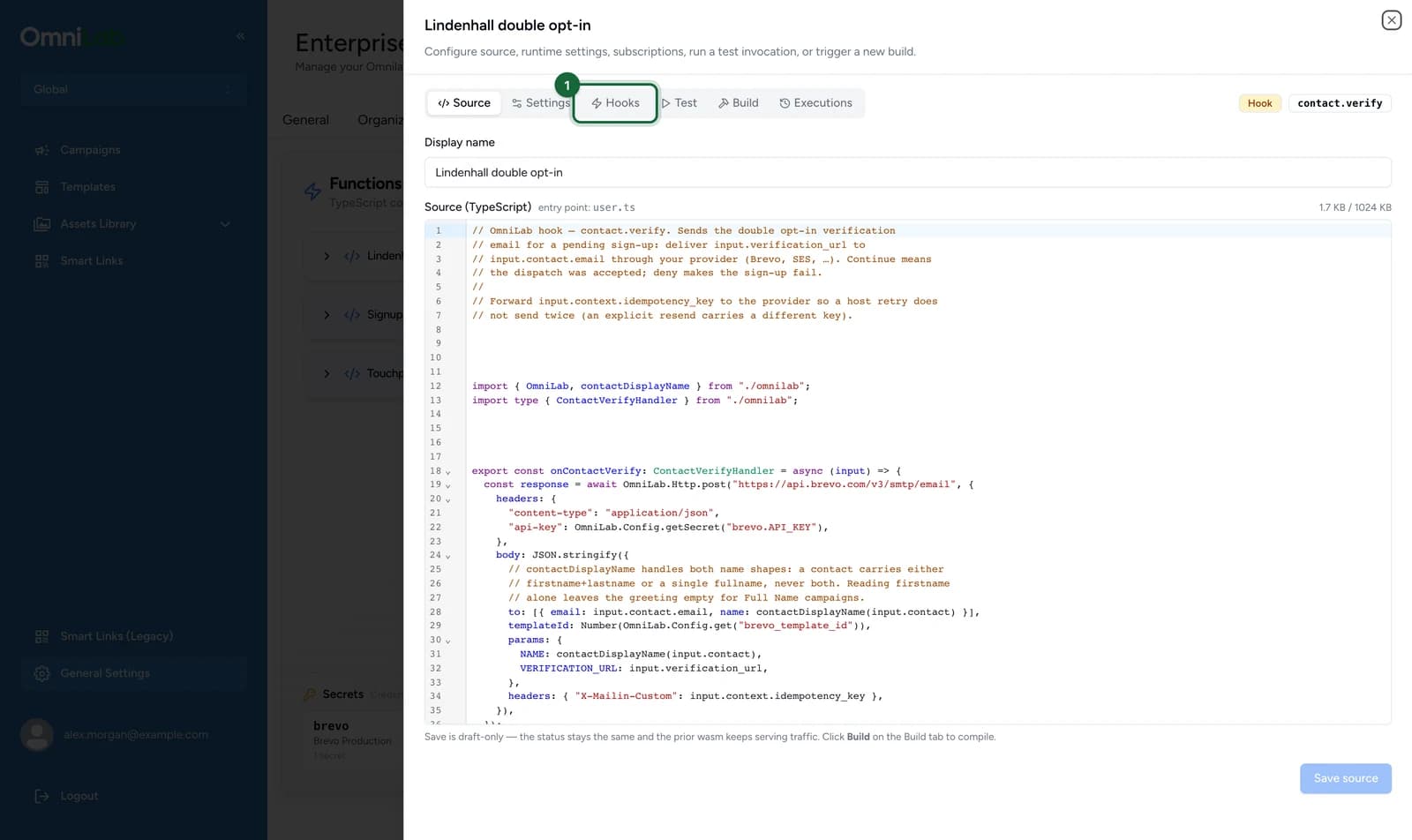
-
Select Add binding.
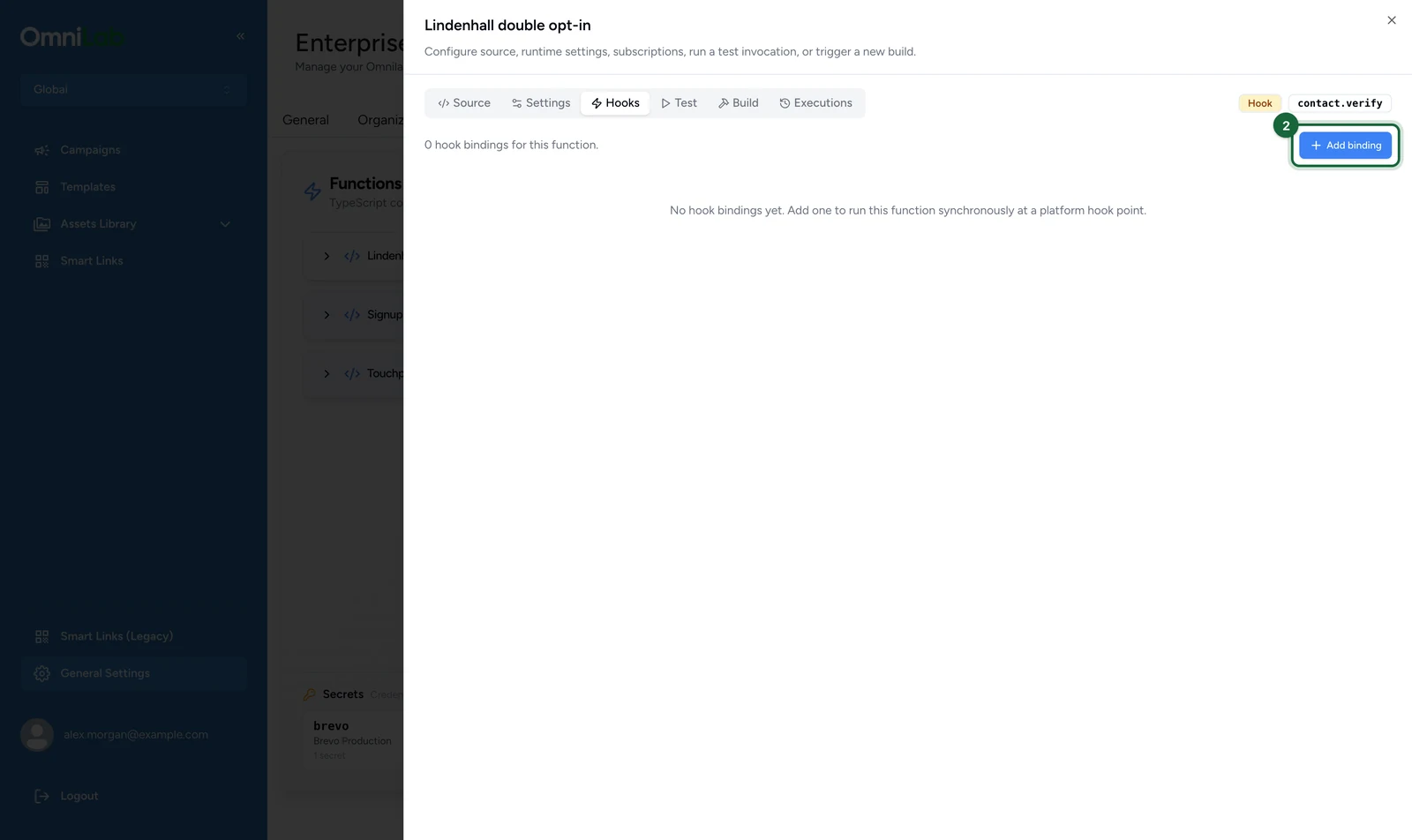
The Hook point is fixed by the function and shown read-only.
-
Under Target groups, select Lindenhall Shopping Centre.
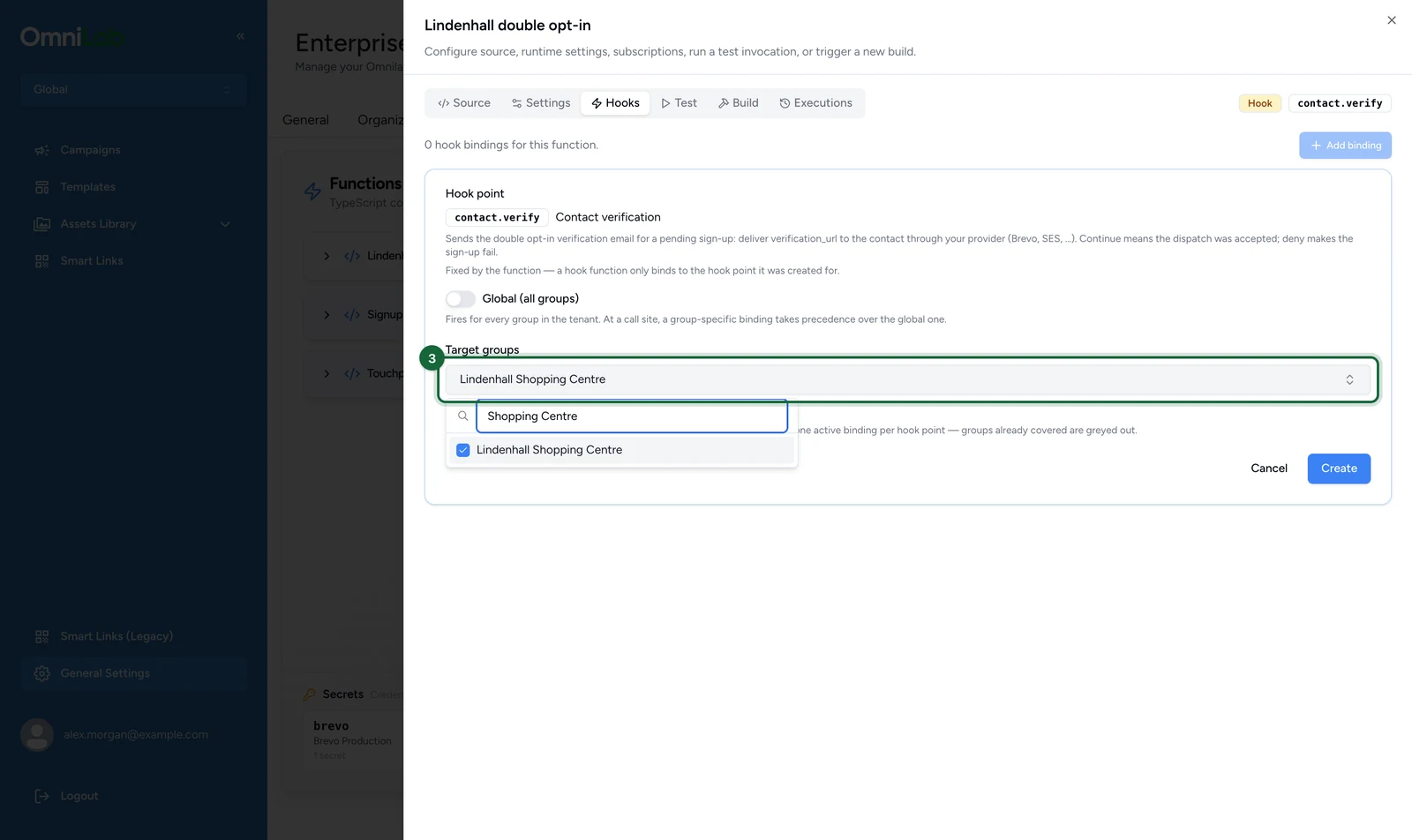
-
Select Create.
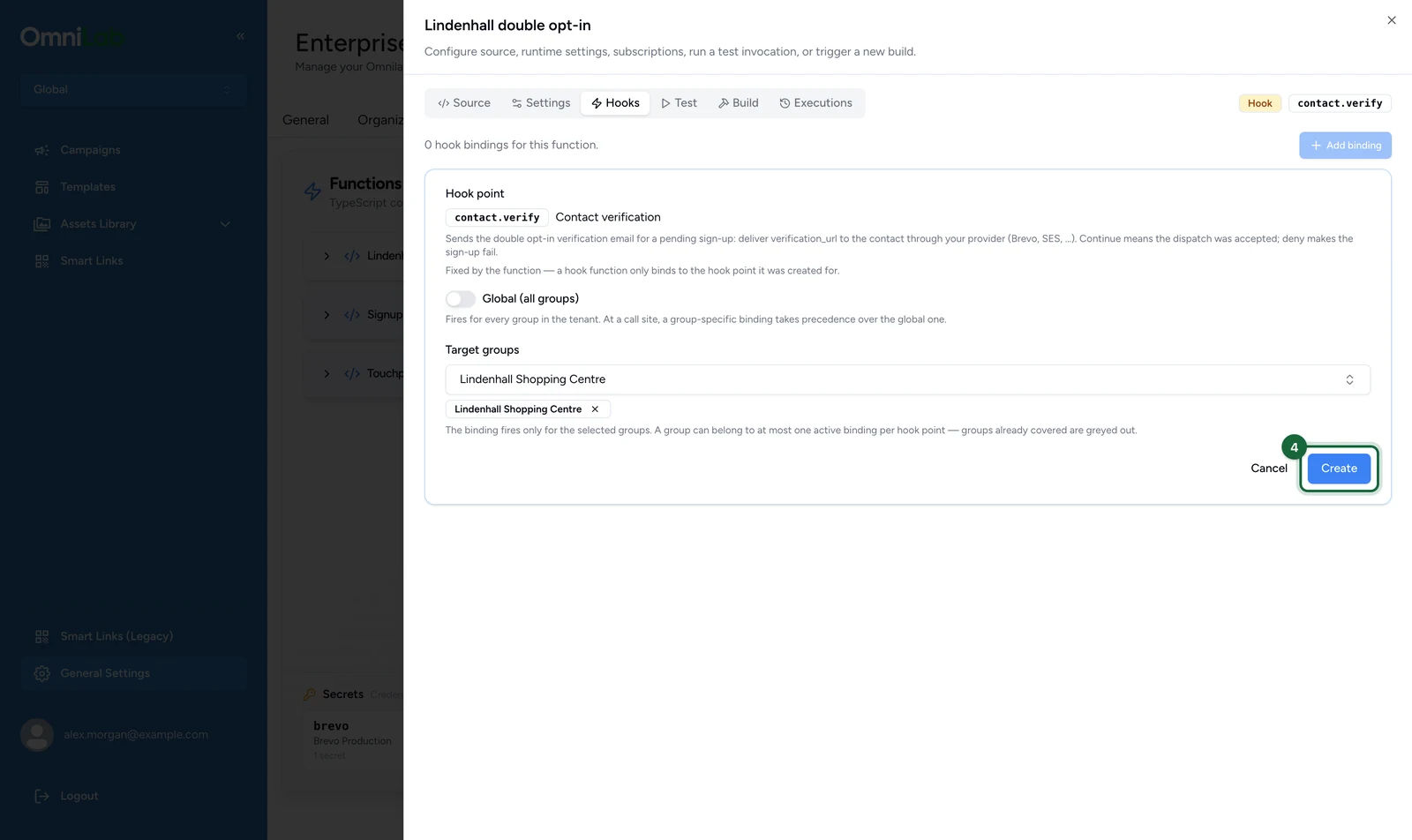
The binding starts Active. To cover every organisation, turn on Global (all groups) at step 3 instead.
The form enforces the scoping rules:
- At most one active global binding per hook point. If one exists, the toggle is disabled and says why.
- A group belongs to at most one active binding per hook point. Groups already covered are greyed out.
- A group-specific binding wins over the global one for its groups. Use a global binding for the default and group bindings for exceptions.
There's no edit action: to change a binding's groups, delete it and create a replacement. For contact.verify, bind before an admin turns on double opt-in: see Double opt-in email verification.
Take a binding out of the live path
What happens next depends on the hook point: see the last row of What a hook guarantees. For contact.verify, disabling the binding makes every double opt-in sign-up fail.
In the function's editor:
- Select the Hooks tab.
- On the binding's row, select Disable.
Enable puts it back. Delete removes the binding and keeps the function. The function card shows unbound when a hook function has no active binding.
If something's blocked
- The Hooks tab is missing: the tab only appears on hook functions. Check the kind badge at the top of the editor.
- The global toggle is disabled: another active global binding covers this hook point. Disable it, or target specific groups instead.
- A group is greyed out in Target groups: another active binding on this hook point already covers it.
- Sign-ups fail since you created a binding: roll back as the guarantees say for your hook point, then read the execution log.
- Runs look clean but operations are refused, or a test shows Contract violation: your handler's answer breaks the contract. See Reading a hook contract violation.
- The verification email never arrives: open the execution detail.
EGRESS_BLOCKEDmeans the provider's host isn't allow-listed.PERMISSION_DENIEDorNOT_FOUNDfromgetSecretis a bundle or key problem: see Configure runtime and secrets.