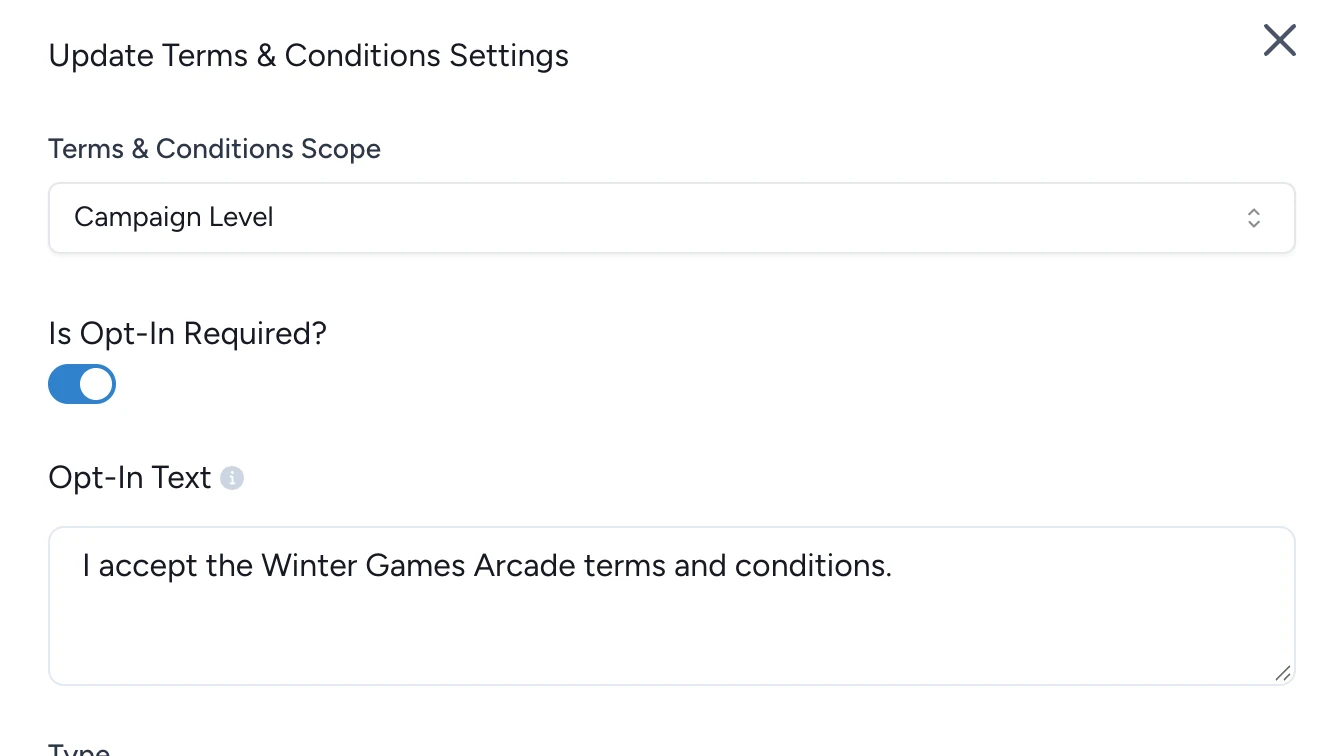
Opt-in reference (PDF vs. External URI, GDPR)
Reference for Opt-in fields, validation messages, and the trade-offs between PDF and External URI terms.
This reference summarizes the Opt-in controls in OmniLab, the difference between PDF and External URI, and the validation messages you are most likely to meet while configuring consent.
Control reference
| Setting | What it controls | Values or format | Notes |
|---|---|---|---|
Terms & Conditions Scope | Where Opt-in is configured | Campaign Level or Touchpoint Level | Scope and requirement are separate controls. |
Is Opt-In Required? | Whether participants must accept terms before they continue | On or off | Off keeps Opt-in disabled. |
Opt-In Text | The consent statement shown next to the checkbox | Translatable text | Keep the wording clear and readable at checkbox length. |
Type | Which terms source OmniLab should use | PDF or External URI | The selected type decides which field appears next. |
Terms and Conditions PDF file | Uploaded terms document | .pdf file | The current settings UI accepts PDF files for uploaded terms. |
Terms and Conditions External URI | Link to the terms page | Full URL | The validation rules expect a valid http:// or https:// URL. |
PDF vs External URI
| Option | Best when | What OmniLab expects | Trade-off |
|---|---|---|---|
PDF | You want OmniLab to point to a fixed document uploaded with the campaign. | A PDF file selected in Terms and Conditions PDF file. | Updating the legal copy means replacing the file. |
External URI | Your organisation already maintains a terms page outside OmniLab. | A valid full URL in Terms and Conditions External URI. | The destination page must stay available and current. |
External URI is often the easiest choice when several campaigns reuse the same legal page. PDF can be simpler when a campaign needs a self-contained document version.
Validation messages
If Opt-in is incomplete, the validation modal surfaces the exact messages below:
| Message | Meaning | Fix |
|---|---|---|
Terms and conditions are disabled for this campaign | Opt-in is off. | Review whether the campaign should collect consent before publication. |
Opt-in is enabled but consent text is missing | Opt-In Text is empty. | Enter the consent statement participants should accept. |
Opt-in is enabled but terms and conditions type is not selected | Type has not been chosen. | Select PDF or External URI. |
PDF type is selected but no PDF file has been uploaded | PDF is selected but no file is attached. | Upload the PDF file. |
External URI type is selected but no URL has been provided | External URI is selected but the link field is empty. | Enter the terms URL. |
External URL '{{invalid_url}}' is not a valid URL | The link format is invalid. | Correct the URL so it starts with http:// or https://. |
See Validation & publishing for the broader publish flow.
Multilingual campaigns
Opt-In Text supports translated content. If your campaign runs in more than one language, add the consent statement in every active campaign language instead of leaving only the default language populated.
The current build flow does not display a dedicated character counter for Opt-In Text, so optimize for clarity and readability rather than length.
Consent records and connected systems
When participants accept the terms, OmniLab records the acceptance event with the consent text, the linked terms destination, the acceptance timestamp, and the active Opt-in level.
In supported email-platform integrations, contact sync can include marketing Opt-in status and consent timestamp as part of the campaign contact data flow. See Email & CRM if your campaign depends on downstream contact activation.
Legal note
Accuracy matters, but legal responsibility stays with you
OmniLab helps present consent text and terms, but it does not replace legal review. Your organisation remains responsible for making sure the wording and the linked terms match the campaign's jurisdiction and use case.